How to use the My Airflow API
The API allows you to view secrets values in plain text. Always exercise the principle of least privilege.
This guide walks you through configuring API access for your personal My Airflow instance.
Step 1: Navigate to User Settings
Click on your avatar in the top right corner and select Settings.
Step 2: Select the My Airflow API tab
In the left sidebar, click on My Airflow API. You will see a list of environments where you have My Airflow enabled.
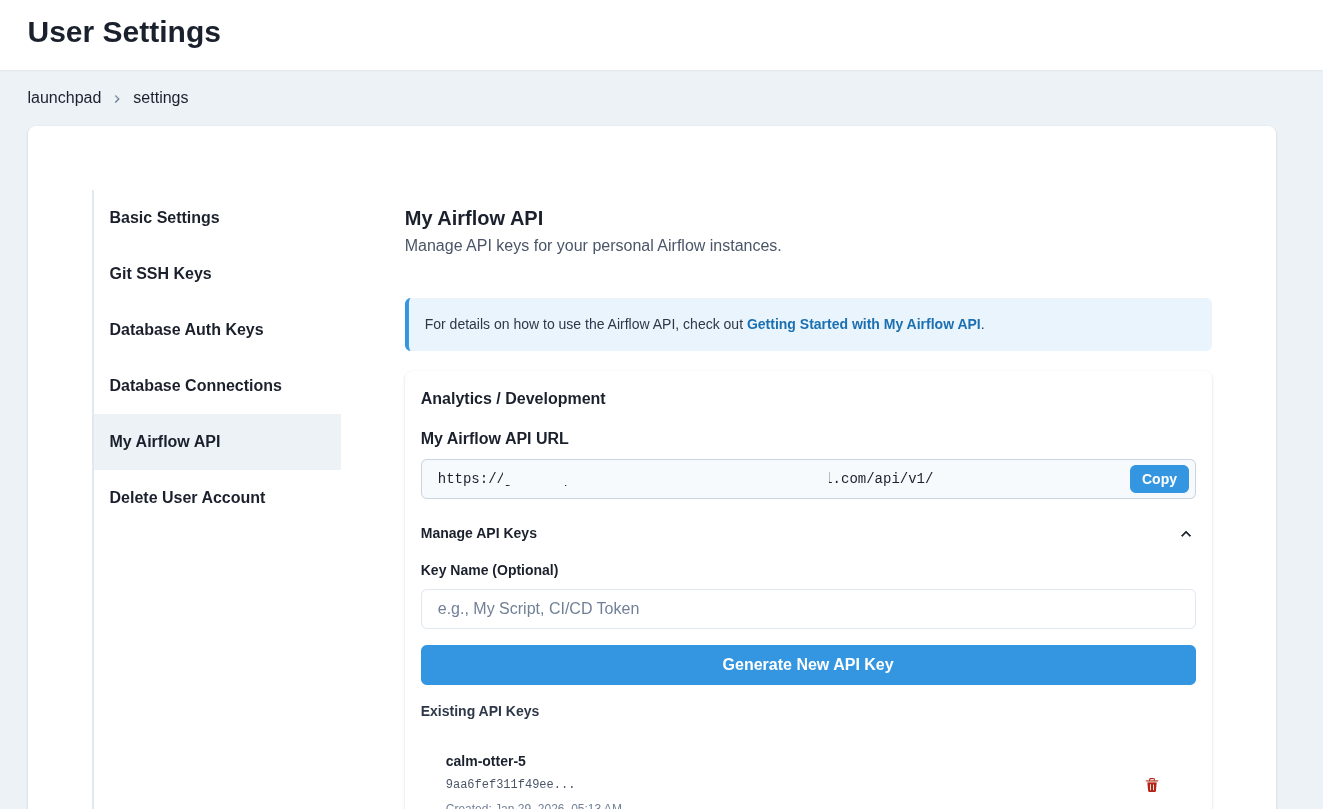
Step 3: Copy the API URL
For your target environment, copy the My Airflow API URL.
Step 4: Generate an API Key
- Click "Manage API Keys" to expand the key management section
- Optionally enter a name for your key (e.g., "My Script", "CI/CD Token")
- Click "Generate New API Key"
- Copy your API key immediately - it will not be shown again
Step 5: Add your credentials to a .env file
Create a .env file inside your orchestrate/ directory and be sure to add the file to your .gitignore. Add your credentials there.
MY_AIRFLOW_API_URL = "https://your-slug-api-airflow-env.domain.com/api/v1/"
MY_AIRFLOW_API_KEY = "your-api-key-here"
Step 6: Use it in a Python script
Below is a sample script that makes use of the Airflow API.
This script does the following:
- Initializes the Airflow API client using authentication details from environment variables.
- Fetches a list of all DAGs from the Airflow API.
- Prints a sorted list of DAG IDs for better readability.
- Triggers a new DAG run for a specified DAG using the API.
- Updates an Airflow dataset using the API.
- Handles API errors and retries requests if necessary.
# airflow_api_call.py
import requests
import os
import json
from dotenv import load_dotenv

load_dotenv()
API_URL = os.getenv("MY_AIRFLOW_API_URL")
API_KEY = os.getenv("MY_AIRFLOW_API_KEY")

def update_dataset(name):
    url = f"{API_URL}/datasets/events"

    response = requests.post(
        url=url,
        headers={
            "Authorization": f"Token {API_KEY}",
        },
        json={"dataset_uri": "upstream_data"}
    )
    return response.json()


def trigger_dag(dag_id):
    url = f"{API_URL}/dags/{dag_id}/dagRuns"

    response = requests.post(
        url=url,
        headers={
            "Authorization": f"Token {API_KEY}",
        },
        json={"note": "Trigger from API"}
    )
    return response.json()


def list_dags():
    url = f"{API_URL}/dags"

    response = requests.get(
        url=url,
        headers={
            "Authorization": f"Token {API_KEY}",
            "Content-Type": "application/json",
        },
    )

    # Extract just the DAG names from the response
    dags_data = response.json()
    dag_names = [dag['dag_id'] for dag in dags_data['dags']]

    # Sort the names alphabetically for better readability
    dag_names.sort()
    return dag_names


def print_response(response):
    if response:
        msg = json.dumps(response, indent=2)
        print(f"Event posted successfully:\n{'='*30}\n\n {msg}")


if __name__ == "__main__":

    # Update an Airflow Dataset
    # dataset_name = "upstream_data"
    # response = update_dataset(dataset_name)
    # print_response(response)

    # Trigger a DAG
    # dag_id = "bad_variable_usage"
    # response = trigger_dag(dag_id)
    # print_response(response)

    # List DAGs
    response = list_dags()
    print_response(response)
Your API keys work for both My Airflow and Team Airflow (if you have access). The token is validated based on your user permissions.
Alternative: Generate keys via CLI
You can also manage API keys directly from the terminal using the datacoves CLI:
# List existing keys
datacoves my api-key list

# Generate a new key
datacoves my api-key generate --name "My Script"

# Delete a key (use the prefix shown in list)
datacoves my api-key delete abc12345
See Datacoves CLI Commands for more details.