CI/CD overview
A CI/CD pipeline makes sure every change to your data project is built and tested before it reaches production, and that production is updated in a predictable way. For data teams this matters even more than for application teams: a broken model doesn't throw an error page, it quietly produces wrong numbers that people make decisions with.
There is no single right pipeline. A small team that ships straight from feature branches to production needs much less than a large team with scheduled releases and business sign-off. Datacoves implements CI/CD from a set of building blocks and combines them to fit each team's process, tools and data warehouse.
This page describes those building blocks and two common ways to combine them. For a complete working example, see the Balboa demo repository and its CI/CD documentation.
Building blocks
Isolated PR databases
Every pull request (PR) is built in its own database. Developers and reviewers can query the result of a change without touching production or each other's work. The database is dropped automatically when it is no longer needed.
Slim CI
The pipeline keeps the dbt manifest of the last production deployment. With it, a PR only builds the models it changed and their downstream models, and reads everything else from production. Builds stay fast and cheap as the project grows, and incremental models keep their history instead of being rebuilt from scratch.
Governance checks
Before the real build, every affected model is created empty to catch SQL and configuration errors quickly, before spending warehouse time on the real build. Then pre-commit hooks check only the files changed in the PR: descriptions and property files with dbt-checkpoint, SQL style with SQLFluff, and YAML with yamllint. The pipeline also comments on the PR with any schemas that dbt would stop managing after the change, so reviewers know they will be dropped when the change is deployed.
Airflow DAG validation
DAGs are checked for import errors, slow parsing and top-level Variable.get() calls, plus any rules your team defines, such as approved tags or allowed operators. See Test Airflow DAGs in your CI/CD pipeline.
Branch rules
The pipeline can enforce how branches are named, which branches can merge into which, and that a branch is up to date with main before it is merged. Conflicts are solved by the developer on their own branch, not discovered during a release.
QA with production data
A group of changes is built together in a QA database that is a zero-copy clone of production. Business users validate the release candidate against real data before it is deployed.
Zero-downtime deployments
Production is deployed with a blue/green strategy, using dbt-coves blue-green: the new version is built next to the current one and swapped in only if every model and test succeeded. If anything fails, production is not touched.
Cleanup of objects removed from dbt
After a successful deployment, a separate step drops the tables and views that are no longer defined in dbt, and the schemas whose models were all removed. Only schemas that dbt created are considered, and a schema that holds objects dbt did not build is kept. The PR check described in Governance checks lists these schemas ahead of time.
Versioning and documentation
Every deployment can get a version number and a git tag, so you always know what is running in production. The dbt docs are regenerated and published on each deployment.
Full refresh on demand
When a change needs incremental models rebuilt from scratch, a label on the PR tells the pipeline to run a full refresh.
Two common flows
The same building blocks support very different processes. These are two common starting points, and many teams end up somewhere in between.
Simple flow: feature to main
Developers open a PR from their feature branch straight into main. Each PR is checked in its own database, and every merge is deployed to production.
| Stage | Runs when | What it does |
|---|---|---|
| 10 | A PR targets main | Builds and tests the change in a PR database, runs governance and Airflow checks |
| 15 | The PR is closed | Drops the PR database |
| 30 | A change lands on main | Deploys to production with blue/green, drops tables, views and schemas no longer defined in dbt, and publishes docs and artifacts |
This flow suits small teams that review each change on its own and don't need a separate business sign-off. It has fewer moving parts, fewer databases and a shorter path to production.
Release flow: feature to release to main
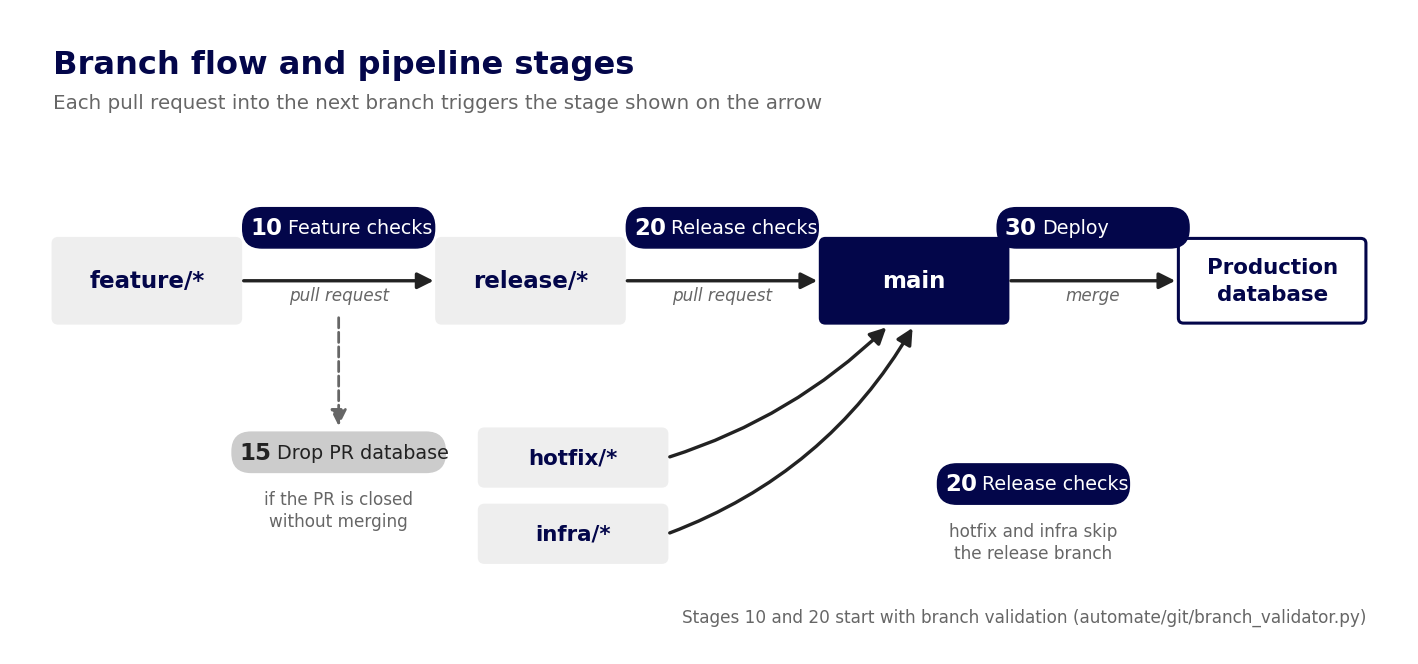
Developers merge feature branches into a release branch, and the release goes to main as a whole after QA. This is the flow implemented in Balboa.
| Stage | Runs when | What it does |
|---|---|---|
| 10 | A feature PR targets a release branch | Validates the branch, builds and tests the change in a PR database, runs governance and Airflow checks |
| 15 | A feature PR is closed without merging | Drops the PR database of abandoned work |
| 20 | A release, hotfix or infra PR targets main | Builds the whole release in a QA database cloned from production |
| 30 | A change lands on main | Deploys to production with blue/green, drops tables, views and schemas no longer defined in dbt, tags the version, publishes docs and artifacts, and drops the PR databases of the shipped release |
Each stage uses its own database, all derived from your production database name:
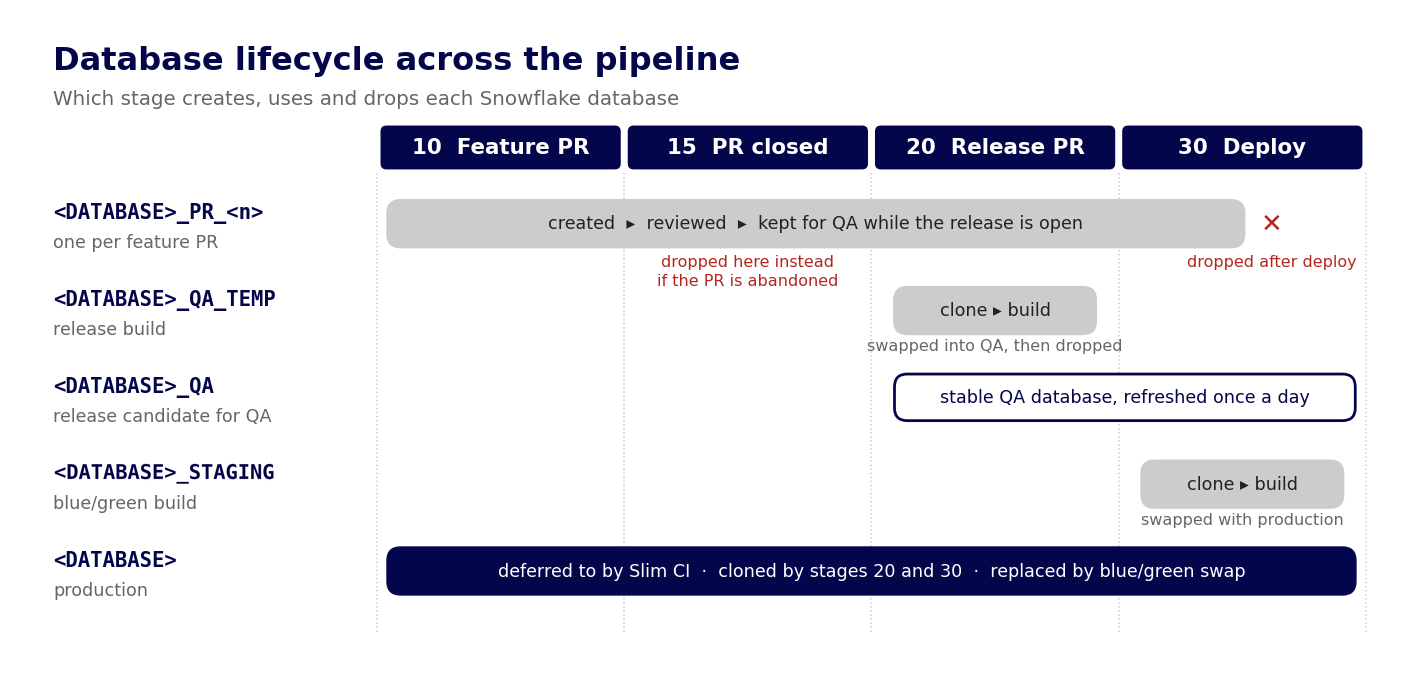
This flow suits larger teams that group changes into scheduled releases, need business users to validate a release before it ships, or want hotfixes and infrastructure changes to follow their own path.
Choosing a flow
| Simple flow | Release flow | |
|---|---|---|
| Path to production | feature → main | feature → release → main |
| QA database with production data | No | Yes |
| Business sign-off before deploy | On each PR, if needed | On the release |
| PR databases kept after merge | No | Until the release is deployed |
| Branch rules | Optional | Recommended |
| Best for | Small teams, frequent small changes | Larger teams, scheduled releases |
You can move from the simple flow to the release flow as your team grows, by adding the release branch, the QA stage and branch rules.
Numbered stages
Pipeline files are prefixed with a number that tells you when in the delivery lifecycle they run: 10 for checks on feature PRs, 15 for cleanup when they close, 20 for checks before main, and 30 for the deployment. Gaps between numbers leave room for your own stages, so the pipeline folder always reads in lifecycle order, whatever flow you use.
Works with your tools
The stages and the decisions they make are plain dbt commands, dbt macros and Python scripts, so they are not tied to one CI/CD tool. Only the platform pieces change between tools: triggers, variables, API calls and how results are reported on the PR. Balboa uses GitHub Actions, and Datacoves has also implemented the same design on Azure DevOps, GitLab and Jenkins.
Every rule can also be changed to fit your team: branch naming, which folders trigger each pipeline, how long PR databases are kept, and new stages for your own checks.
Learn more
- CI/CD pipelines in Balboa: step-by-step details of the release flow, and how to simplify or customize it
- Git best practices
- Develop and release a feature
- Trigger CI/CD without code changes
- Configure a project's CI/CD in Datacoves