GitHub MCP Server
The GitHub MCP server lets your AI tools read your GitHub repositories, pull requests, issues, and CI checks, so you can ask questions like why a check failed and get an answer based on the real pull request.
It is backed by GitHub's official MCP server.
Prerequisites
- The GitHub MCP server enabled for your environment (see Enabling).
- A GitHub personal access token with access to the repositories you want the AI to read.
Provide your GitHub token
The GitHub MCP server acts as you, using your own personal access token. You provide it as a VS Code environment variable, so it is never shared with other users.
Step 1: Create a personal access token
In GitHub, create a personal access token (classic or
fine-grained) with at least repo scope. Copy the token, you will not be able to see it again.
Step 2: Add it as an environment variable
Add the token as a user-level VS Code environment variable named:
GITHUB_PERSONAL_ACCESS_TOKEN
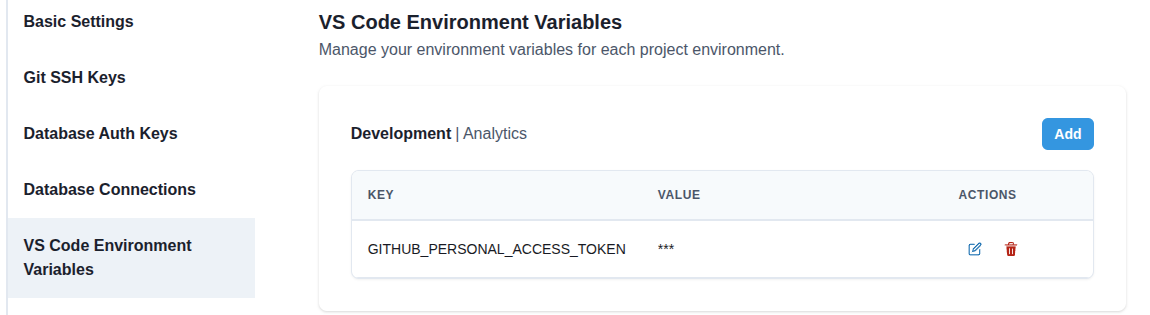
The value is automatically masked in the UI because the variable name contains token.
Enabling
An administrator enables the server in Admin > Environments > your environment > AI Tools > MCP Servers by turning on GitHub.
Use it
Start (or restart) your workspace so the AI tools pick up the server, then ask, for example:
Check my last pull request, figure out why the CI check failed, and recommend a fix.
List my open pull requests in this repository.